

Whether you’re an experienced or beginner/new Mac user, how to Change Screen Resolution on Mac is vital and you must know about that. To get the most out of your display, fully read our article and follow the following steps.
I Raj Chaubey give you a few simple steps to Adjust Screen Resolution on Mac without getting any issues/problems.
Let’s get started!
Page Contents
- How to change your screen resolution of the built-in display on Mac
- Set screen resolution manually and control it more strictly
- How to set custom resolutions for external displays on your Mac
- FAQs
How to change your screen resolution of the built-in display on Mac
- Click the Apple Logo → Goto System Settings.

- From the left panel, Select Display → Choose a resolution.

- Click Change Resolution.
Note: maybe the scaled resolution does not fit all applications on the screen.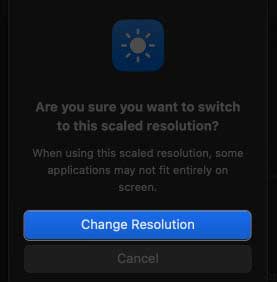
Set screen resolution manually and control it more strictly
- System Settings, Go to Display in → Select Advanced.

- Toggle on Show resolutions as list → Then click Done.

- Choose a resolution.

How to set custom resolutions for external displays on your Mac
If you have an external display paired with your Mac then follow the steps which are below:
 Read this nextHow to Fix iCloud Photos Not Syncing: The Ultimate Troubleshooting Guide
- Navigate to Apple Logo → System Settings→ Display.
- Select your external display/monitor → And after that choose a resolution.

- Toggle on Show all resolutions for more customization options.

- Select the resolution of your connected screen.

Enhance your Mac experience!
Following the steps outlined in this guide/tutorial, you can control your screen resolution on Mac to according your needs. You can try out several resolutions until you discover the one that works best for you. If you have any problem regarding any technical issues then feel free to “Ask ME!” in the section.
FAQs
How do I increase my Mac screen resolution to 1920×1080?
Using third-party software, you may configure your Mac to run at 1920×1080 resolution. However, be aware that a custom resolution may cause some applications to work not correctly. So, testing before applying your new resolution regularly is essential.
Do changing the screen resolution on my Mac damage my PC?
No, changing the screen resolution can not damage your computer. However, if designed to run on a specific resolution then the software does not work properly.
Does the screen resolution on my Mac will changing affect the quality of the images and videos I view?
The quality of the films and graphics you view can, in fact, be impacted by altering the screen resolution on your Mac. Lowering the resolution can make images & videos look pixelated. So, increasing the resolution can make them look sharper & more precise.
How do I change the quality on my Mac?
High quality increases the quality of the screen. Due to this videos and images start to look better. While changing the resolution, you have to pay attention that all your software should work properly on that resolution.
Why is my screen resolution so low?
There are many reasons that can change the resolution. Such as a corrupted graphics driver, a conflicting third-party app, or a new iOS/OS update. In this case with your display, you can easily fix these problems by changing the resolution settings. Press Win + I to launch Settings & navigate to System > Display > Change the resolution.